MyRacing Pulse app icon Pulse records · MyRacing Pro explains

Every lap, captured.
Every session, explained.

Two apps, one telemetry system. MyRacing Pulse records every lap from the phone on your motorcycle. MyRacing Pro reads the session and tells you where the time went, and why. One account, €4.59/month.

Pulse is your live pit board on the bike: lap times, a live delta, your projected lap and lean angle, live as you ride. One tap later the session lands in MyRacing Pro as your racing line, your braking points and the time each corner cost.

NEW Turn your racing data into answers

The MyRacing telemetry system.

Pulse records your laps and shows your times while you ride. After the session, MyRacing Pro shows your racing line, where you lost time and what to work on next.

You've heard telemetry is…

Expensive. Complicated.
Not for you.

That reputation was built by €300-to-€900 loggers and software written for race engineers. We built Pulse and Rider Pro for riders who want to understand their laps without buying a dedicated logger.

Real telemetry costs a fortune.
— everyone in the paddock
The whole system is €4.59/month.

A dedicated logger can cost €300 to €900 before you read a single lap. Download Pulse free and use Rider Pro to record your laps and see where you lost time.

You need a van full of equipment.
— the guy with the van
You need the phone in your pocket.

No wiring loom, no dash, no memory cards, nothing to fit. Mount the phone you already own, Pulse records the session and shows your times live, and one tap sends it to MyRacing Pro. Set-up is minutes, not a workshop.

You can't read that data anyway.
— someone still guessing
MyRacing Pro reads it for you.

Standalone loggers hand you raw charts and a shrug. Pulse hands your session to MyRacing Pro, which draws the answers for you — your racing line, your braking points, the mistakes named corner by corner and exactly where the time went. No spreadsheets, no engineer.

Pulse is free to download · Powered by Rider Pro
€4.59/month

One account across Pulse and MyRacing. Sign in to Pulse with your Rider Pro account to use the live pit board, record laps and analyse sessions.

Create your Rider Pro account →

Then download the recorder:

Full Plans comparison →
MyRacing in action

The same setup the team runs.

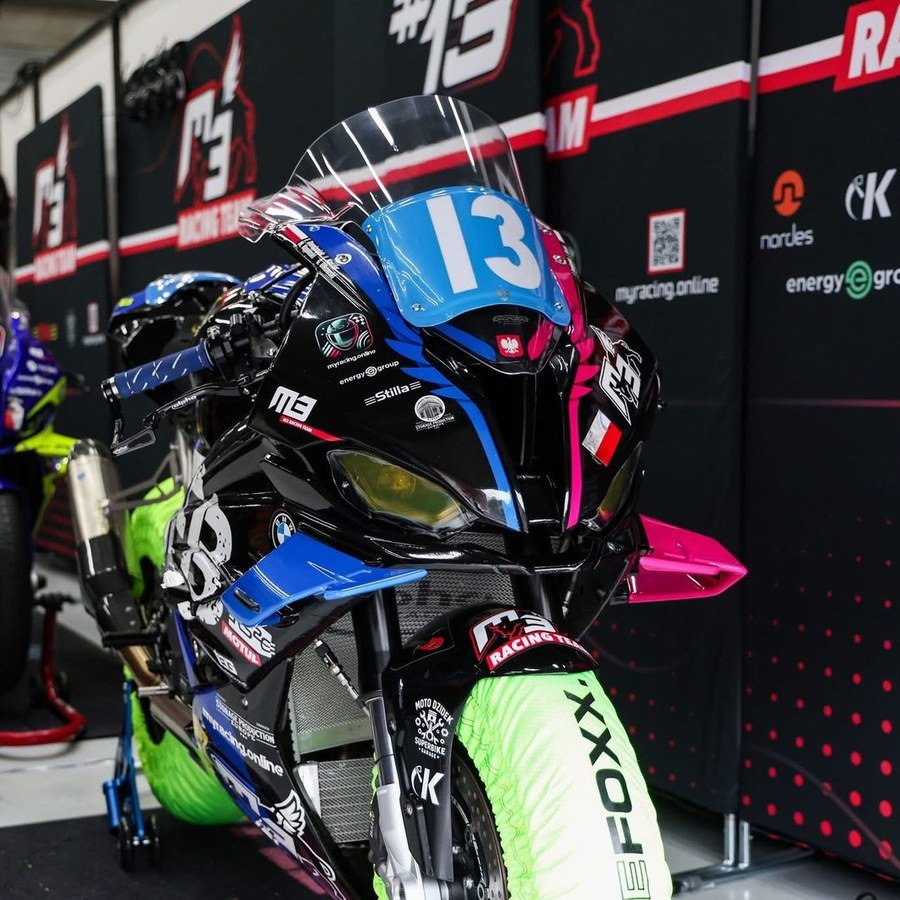
Phone on the bike, external GPS and the ECU wired in, on a pre-test day before the Bol d’Or.

FlyingBuffs M3 Racing pit box during pre-tests before the Bol d’Or
FlyingBuffs M3 Racing · pre-tests before the FIM EWC 24h Bol d’Or
On the bike

What Pulse captures.

Pulse is your live pit board and telemetry recorder while you ride. It records what the motorcycle did, and your heart rate alongside it.

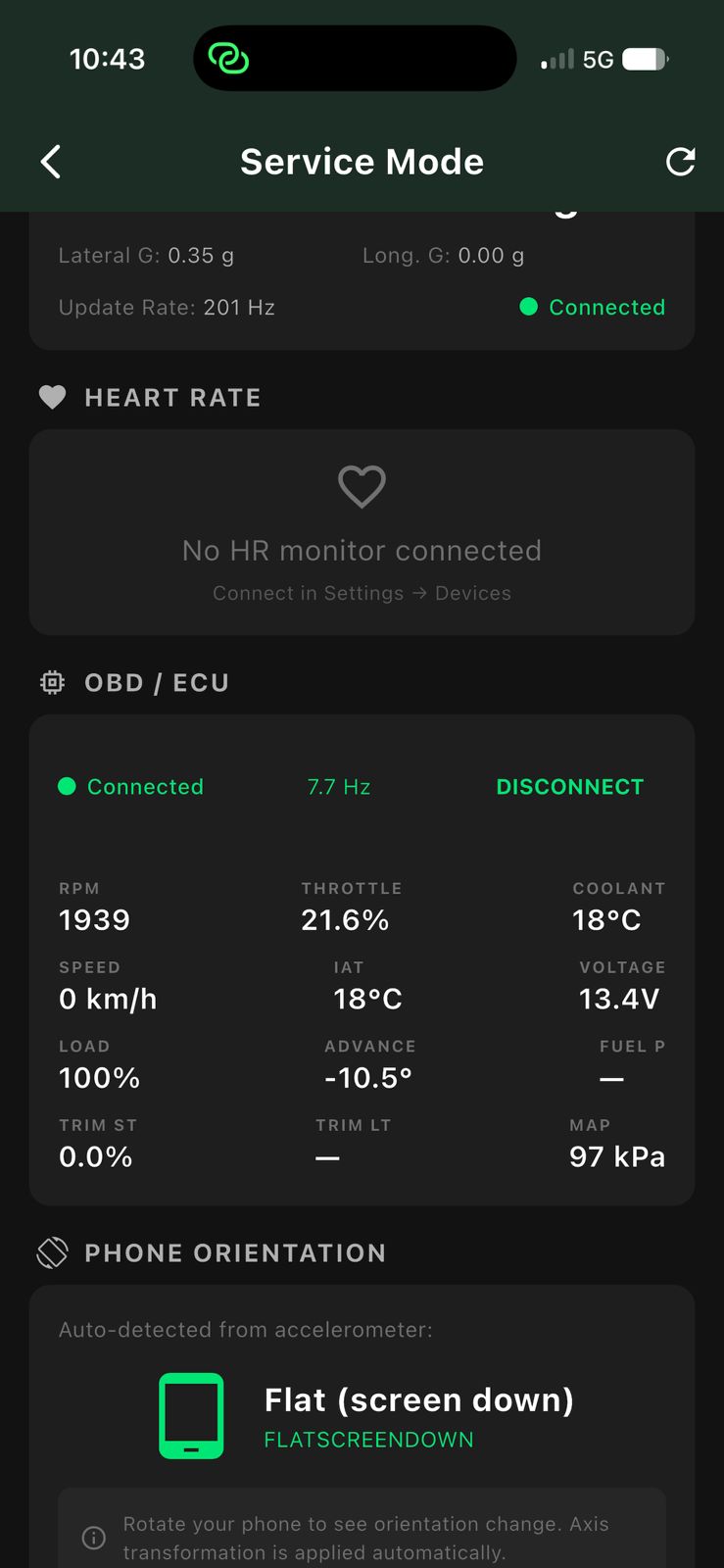
Pulse — live OBD/ECU data: RPM, throttle, temperatures
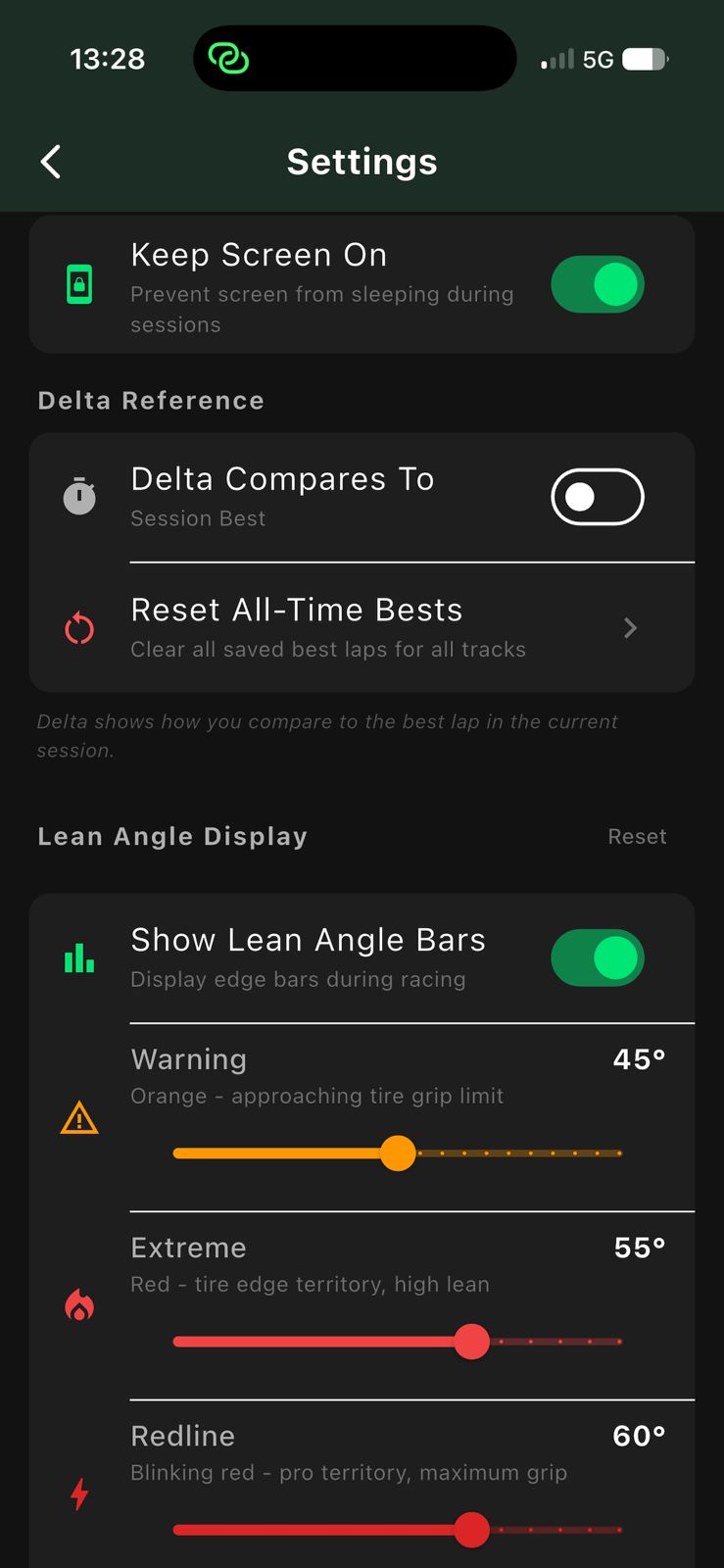
Pulse — settings: delta reference and lean-angle bars

Two ways to record. Start with just your phone; its GPS and motion sensors already capture position, speed, lean and G-force. For more detail, add an external USB GPS receiver (u-blox M9 class) and you're logging 25 positions a second with ~100 Hz motion. The same lap, recorded in five times the detail.

Your pit board, live. Lap and sector times land the second you cross the line, next to a live delta against your best, a projected lap time and a live lean-angle horizon. Your times are called out in your helmet, so you get them without looking down.

Any track, your finish line. Ride an official circuit, or add your own track. Draw your own start/finish line on the map. Either way laps detect automatically. Adjust your own sector lines for sector times analytics.

Your heart rate, lap by lap. Pair any standard Bluetooth heart-rate sensor: chest straps and sport watches from Polar, Garmin, Wahoo and Google Fitbit, including the Fitbit Air, all work. Pulse logs your heart rate lap by lap, so you see what that last stint really cost you.

What the engine was doing. Plug in a compatible Bluetooth OBD-II adapter (ELM327-class, e.g. UniCarScan) and Pulse records the ECU right alongside the GPS. Your bike decides how much it shares: RPM, throttle, temperatures and more. Every lap then carries exactly how it behaved.

Your GoPro rolls itself. Pair a GoPro (HERO9 Black and newer) and Pulse starts and stops it with your session. It even drops a HiLight tag at every lap and sector crossing, so the moments worth rewatching are marked before you open the footage.

Context filled in, nothing to type. Every session pulls your bike, setup and tyres straight from your MyRacing garage. The weather fills itself in from the track's location and time.

Built for the paddock. Everything records locally on your phone, no network signal needed. Upload later, once you're back in coverage.

Then MyRacing Pro goes to work

What your data becomes.

Your whole session measured, from each lap down to every corner and every braking zone inside it. What your technique actually looks like, how you brake, how repeatable you really are. And the areas worth training next, explained in plain words, to buy you the next few seconds.

Racing Line

What was my bike actually doing at that point of the corner?

What you remember about a corner, checked against the speed, lean, G and throttle you really had there.

Your lap replayed in 2D or 3D with the numbers travelling alongside it: speed, lean and G, and with an ECU connected, revs, throttle and temperatures drawn under the map. In 3D you can watch the lap back from the saddle, from behind the bike or from above, on a modelled circuit that carries its real elevation, so a corner that drops away looks the way it does when you ride it. Braking points and roll-offs sit on the line itself, so you can see the place on the circuit where you let the gas go. Full screen puts the map and every trace on one page, and the same numbers can run over your onboard footage through the Overlay Tool.

Advanced braking analysis

How close to the same braking point do I get, lap after lap?

Know which braking zones you can already trust, and which ones still have metres in them.

Every braking zone on every lap, measured six ways: peak force, sustained force, how fast it builds, how you release it, the impulse it carries and how repeatable your braking point is. Corner by corner you see how far your braking point moves from lap to lap: at one zone it lands within two metres, at another it wanders by nearly eighty. The zones that wander are the ones with time still in them. Deceleration comes from how the motorcycle actually slowed down, so it holds whether you were on the front brake, the rear, or the engine.

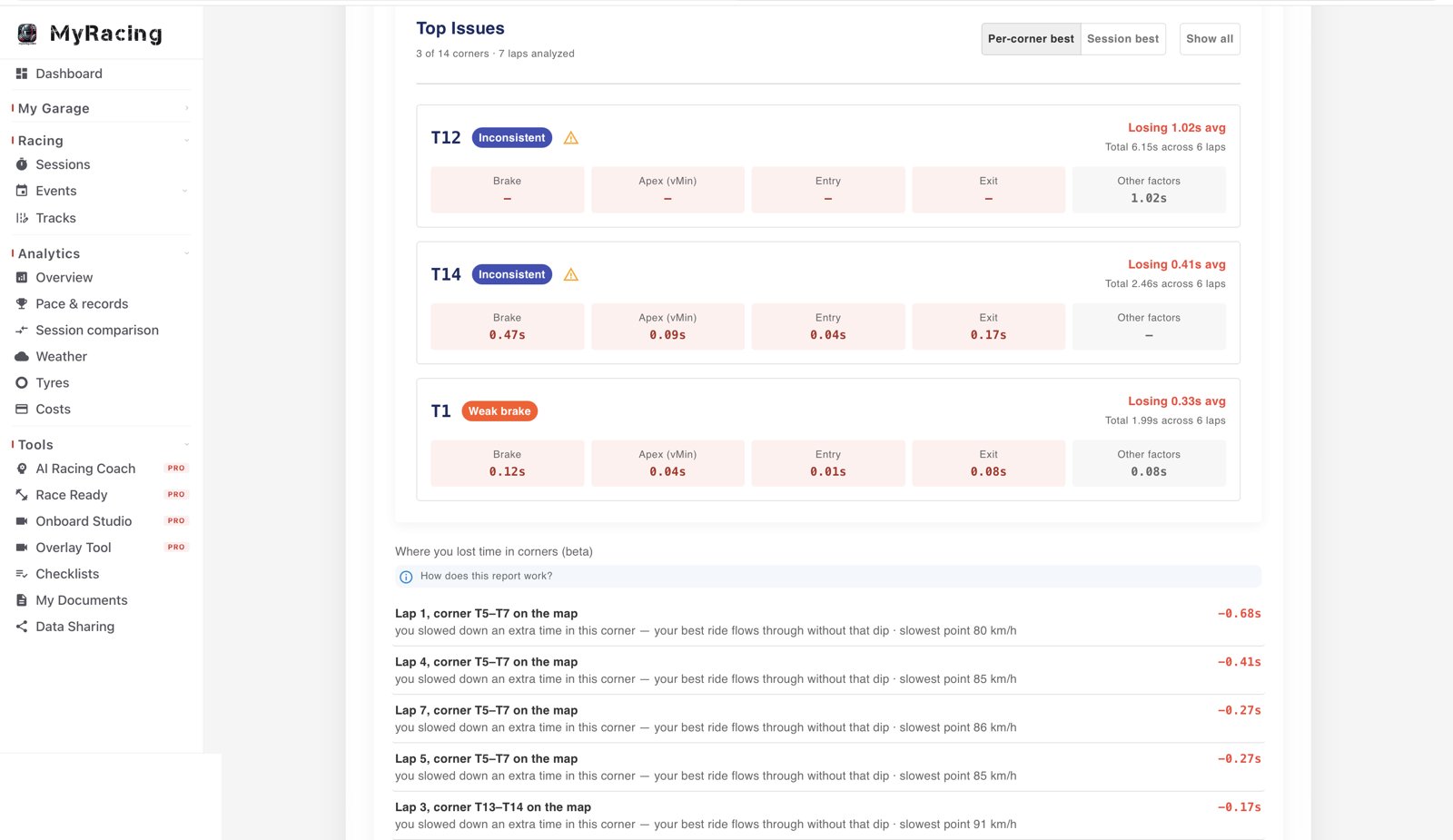
Top Issues

Which corner has the most time in it for me?

The corner that costs you the most, and the part of it that is actually doing it.

Your marked corners, ranked by the time they cost you in this session, each one measured lap by lap against your own best pass through that same corner. Where the same fault keeps coming back, it gets named — inconsistent, weak brake, brakes too early. The loss is split across braking, apex speed, entry and exit with the weight each part carries, so you can read which part of the turn is doing it and what that part is worth in seconds. Whatever those four do not account for is listed as other factors, instead of being quietly folded into the total.

Top Issues in MyRacing Pro: marked corners ranked by the time each one costs, with the fault named

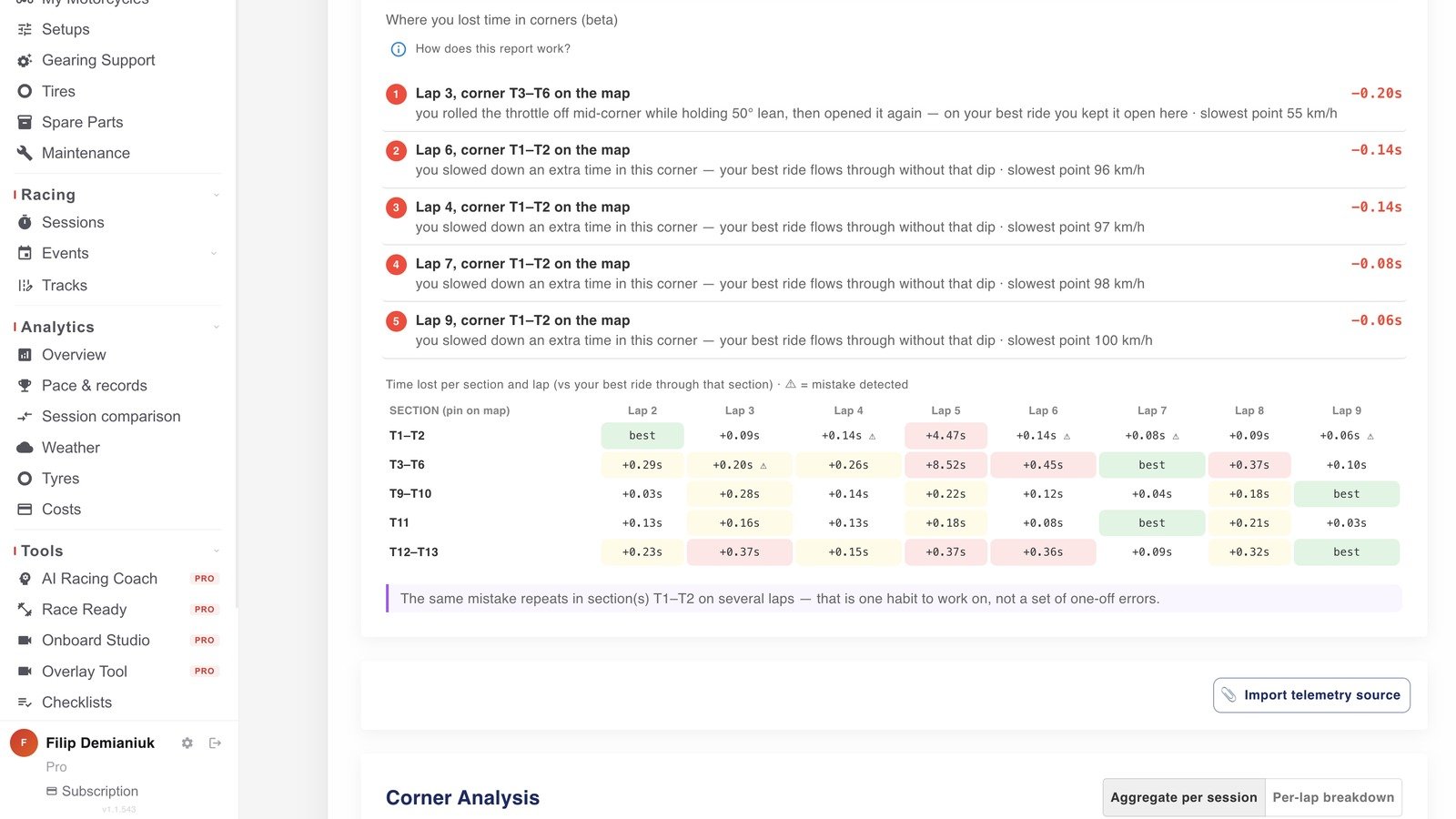
Where you lost time in corners

Was that one bad lap, or do I do it every time?

Know whether the time you lost was a one-off, or something you do on every lap.

Every lap of the session, section by section, measured against your own best ride through that same section. For every section where you lost time, the report says what was different: how you handled the throttle, how far you had it leaned, the speed you carried and how you braked. It also tells one bad lap apart from something you repeat: when the same loss turns up in the same section lap after lap, it says so, and that is the one worth training.

Where you lost time in corners, in MyRacing Pro: every lap compared section by section against your best ride through that section, with repeated mistakes named

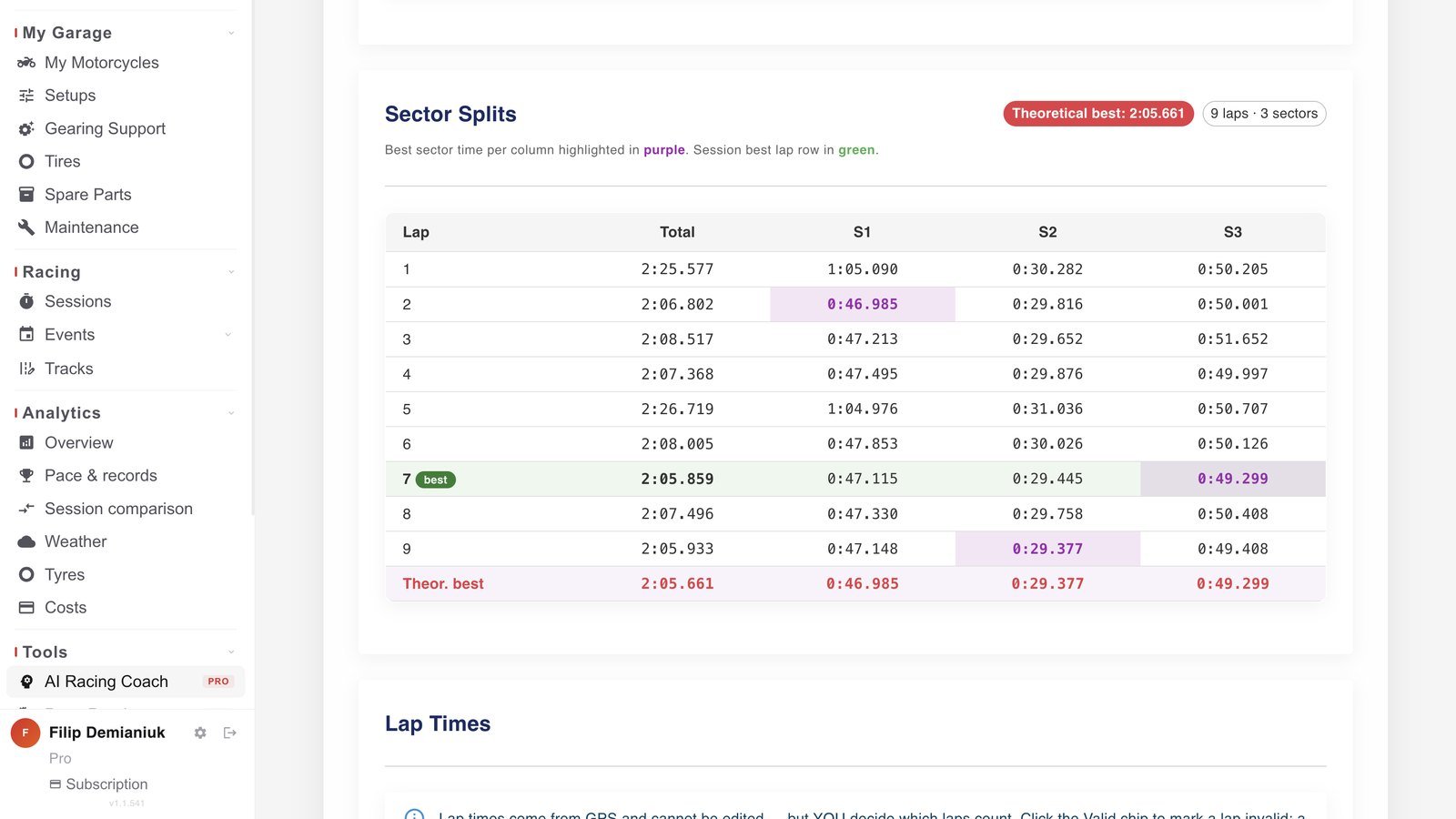
Sector Splits

Which of my sectors am I already quickest in?

Your best sector times, and the lap they add up to today.

Your quickest time in each sector, usually set on different laps, with the theoretical best adding them up. You place the sector lines yourself, so a split can end right after the corner you are working on.

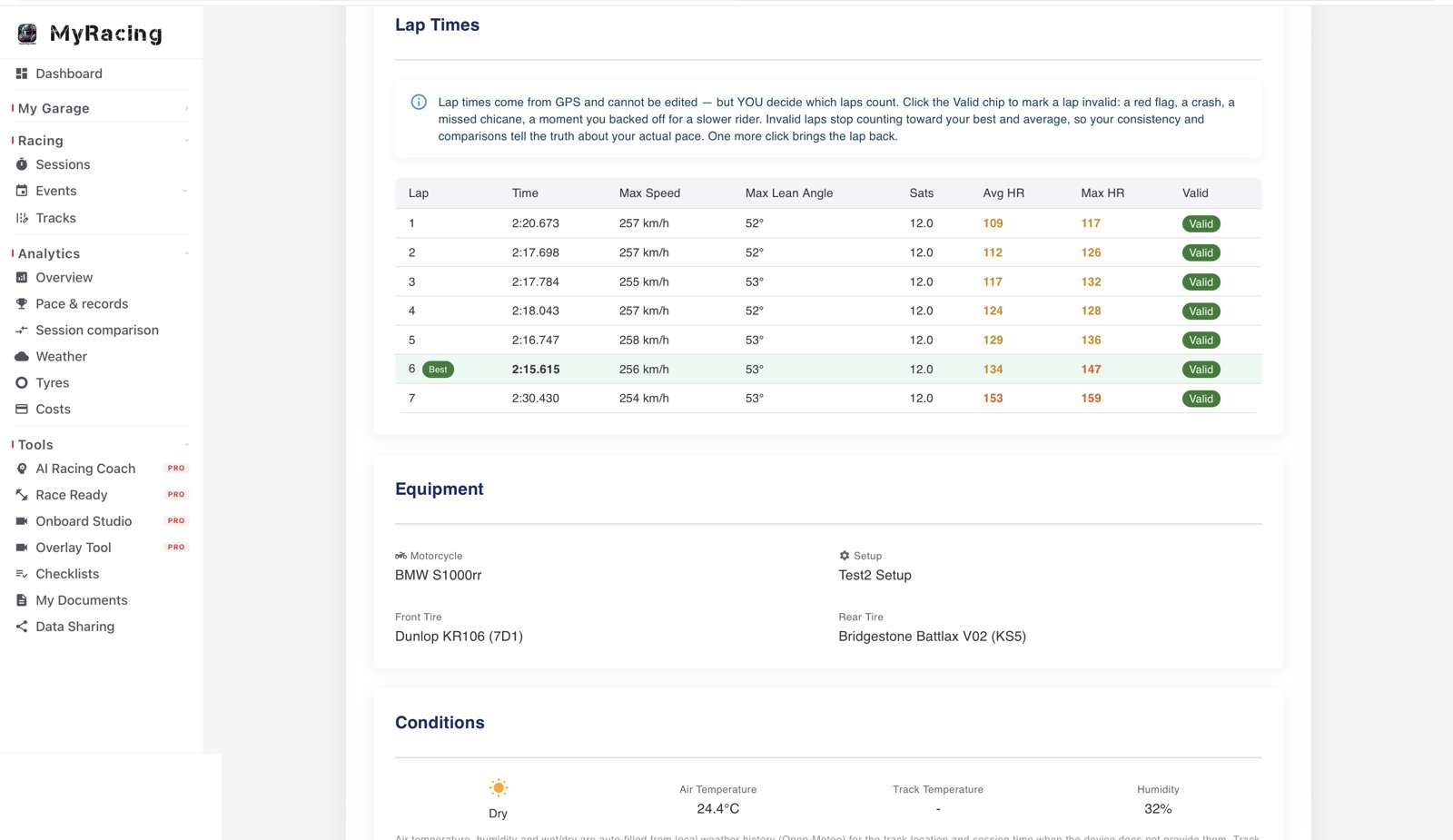
Lap Times

Which of my laps actually show my pace?

Your numbers describe the riding you actually did.

Every lap of the session with a best and an average that count only the laps that belong in them. Mark the lap where you backed off for a slower rider as invalid and it drops out of both, until you put it back.

Rider Workout

How much of my pace at the end of the session comes down to fitness?

See how hard the session worked you, next to how fast you went.

Your effort across the session set next to your pace: active time, distance, and average and maximum heart rate when you wore a strap. Add your body mass and it estimates the energy you burned, and it marks which numbers are measured and which are estimated.

Sector Splits in MyRacing Pro: sector times for every lap with the quickest sector highlighted and the theoretical best underneath
Lap Times in MyRacing Pro: every lap of the session listed, with laps marked invalid excluded from the averages
Head to head · in MyRacing

Compare any two laps.

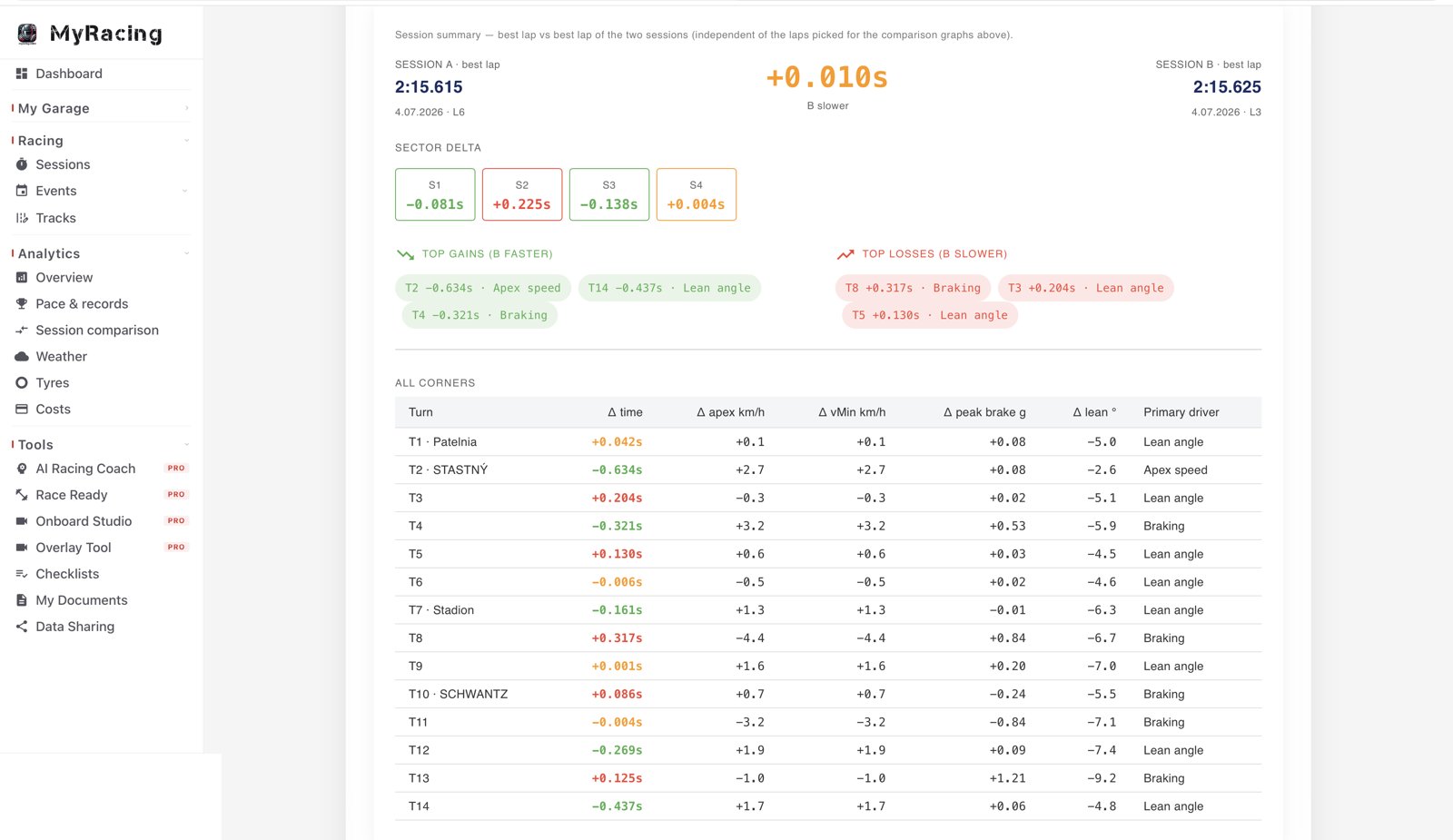
Pick any two laps from your history: today's best against last month's, qualifying against the race, even from two different sessions. See where you gain and where you lose, and what made the difference.

Session vs session — best lap compared corner by corner, with sector deltas, in MyRacing Pro

Every channel, side by side. At any point on the track, see both laps' speed, lean, braking G and heart rate, read straight off the map as you scrub along the lap.

Two speed traces on one chart. Both laps are drawn against the same track position, so every difference has an exact place on the circuit.

Where the gap actually is. A gain/loss curve runs along the whole lap, and the same gap is colour-coded straight onto the racing line, so you can follow where it moves.

One account, both apps

Next session, you'll know
where the time went.

Create your Rider Pro account first — Pulse signs in with it. Then mount the phone you already own and ride. €4.59/month.

Create your Rider Pro account →

Then download the recorder:

Full Plans comparison →

How a lap becomes
an answer.

Three steps, and everything that sits on the motorcycle while you ride.

Record
MyRacing Pulse · the telemetry recorder

Every lap from the phone on your motorcycle — racing line, speed, lean angle and G-force, with lap and sector times live as you ride.

Upload
One tap · back online

Everything records locally at the track. One tap sends the session on when you are back online.

Understand
MyRacing Pro · the telemetry analytics

The session opens with every corner measured and the time loss placed on the map.

ALL YOU NEED REC 1:47.2 LAP 6 · BEST −0.41 LEAN 47° GPS · 25 Hz Phone + Pulse records every lap on the motorcycle LINE · SPEED · LEAN · G · LAP TIMES External GPS 25 Hz Heart-rate EFFORT PER LAP GoPro VIDEO PER LAP Engine · ECU THROTTLE · RPM OPTIONAL — ADD ANY, OR NONE one tap the session uploads · no signal needed at the track T12 −1.02s MyRacing Pro reads the session — corner by corner WEB + MOBILE · INCLUDED IN RIDER PRO

It finds the time you are losing — the corner, the braking point and the reason.

Recommended setups

Every setup uses Pulse and Rider Pro. Optional hardware adds more precision or another source of data, but the phone setup already gives you recording and full session analysis.

Start here
Track-ready
Phone · Pulse · Rider Pro

Start with the phone you already own.

While you ride: See lap and sector times, live delta and projected lap on the bike.

After the session: See your racing line, braking points, the corners costing time, consistency and theoretical best.

What you get: You finish the session knowing where the time went and what to work on next.

iOS or Android · phone GPS around 5 Hz · no extra hardware

Add precision Optional

Chase the tenths.

Add an external M9 GPS.

What it adds: Record 25 GPS positions a second with ~100 Hz motion data for a more detailed trace of every lap.

What you learn: See finer differences in racing line, braking points and corner speed.

Find the gains that hide when two laps look almost identical.

Android with USB-C · u-blox M9 class · 25 Hz GPS

Add engine data Optional

Read the bike.

Add Bluetooth OBD-II.

What it adds: Record RPM, throttle and temperatures with every lap.

What you learn: The engine trace stays synced to the map and speed trace.

See what the bike was doing at the point where you gained or lost time.

ELM327 class · available channels depend on the bike

Add context Optional

Footage and effort, on the same lap.

Add GoPro and/or a heart-rate sensor.

What it adds: Pulse starts and stops the GoPro with your session, marks every lap and sector in the footage, and logs your heart rate lap by lap.

What you learn: Match the onboard footage with your session data and see how your effort changed from lap to lap.

Go back to the laps you want to see again, and see whether fatigue changed how you rode.

GoPro HERO9 Black+ · standard Bluetooth heart-rate sensor

Start with the phone you already own.

Download Pulse free and sign in with Rider Pro.

Example configurations, not hardware packs · add-ons are bought separately

Pulse is free to download · Powered by Rider Pro

Recorder and analysis, one account,
€4.59 a month.

That is the whole price. No logger to buy, and nobody to read it for you. With Rider Pro, Pulse is your live pit board and lap recorder. After the session, MyRacing shows which corners cost you time, what happened in each one and what to work on next.

Riders like you

Built for how you actually ride.

Telemetry you can read without training. Pulse works at whatever level you ride.

The track-day rider

Phone mounted on the bike, Pulse running.

By the second coffee you know your best lap, your consistency, and the corner that's costing you half a second.

The club racer

External GPS on the bike, 25 samples a second.

No more guessing where that time went when qualifying. Everything right there on the map, braking point by braking point.

The rider with a coach or mechanic

Stop describing what you think happened.

Share the session — the line, the braking, what each corner cost — and talk about what actually happened.

Everything measured — nothing to wire up

Measured. Drawn. Answered.

Pro loggers hand you channels and a desktop app to make sense of them. Pulse records the same telemetry, and MyRacing Pro draws it. No export, no math channels, no engineer at a laptop: every number below is already on the map and on the trace.

Captured on the bike · Pulse
  • Racing line & position up to 25×/sec
  • Speed GPS
  • Lean angle IMU · ~100 Hz
  • Lateral & longitudinal G
  • Lap & sector times live on the bike
  • Projected lap time live delta
  • Heart rate Bluetooth sensor
  • Engine / ECU OBD-II adapter
Drawn & answered · MyRacing
  • Racing line by speed · lean · G · revs · throttle
  • Lap replay speed · lean · heading · distance, live
  • Two-lap compare speed · lean · braking G · HR, everywhere
  • Braking points detected from the physics, every lap
  • Corner analysis entry · apex · exit · lean · G · radius
  • Sector splits retroactive, to the millisecond
  • Session vs session every corner, and the reason
  • Ideal lap · theoretical best · consistency
  • Mistakes named in plain language (beta)
  • Onboard video your numbers over the footage

Upload once. Everything above is computed automatically. Mark your corners once per track, and your whole history there re-analyses itself.

Good to know

Questions, answered.

What is MyRacing Pulse?
Pulse is the telemetry recorder of the MyRacing platform, on iOS and Android. It rides with you, records your laps and shows live times on the bike, then uploads each session to MyRacing Pro, the telemetry analysis side, where it becomes your racing line, braking points and the mistakes named corner by corner. Together they form one telemetry system; you get both with Rider Pro.
How is Pulse different from the MyRacing app?
Two apps, one telemetry system. MyRacing (web, iOS and Android) is the analysis: sessions, analytics, tracks, garage and the AI Racing Coach. Pulse is the recorder — it captures telemetry on the bike and creates a session for MyRacing Pro to read. Deliberately separate: Pulse records, MyRacing Pro analyses.
What do I need to run it?
Your phone — Pulse lives on it and records with the phone's own sensors at around 5 Hz. For racing-grade precision, connect an external GPS receiver over USB and record at 25 Hz. The phone is always the recorder; the receiver is the upgrade, and it needs Android (USB-C). Phone-only recording works on both iOS and Android. Sector times appear on tracks with sector lines set — draw your own in the track editor.
Does it work without network signal?
Yes. Everything records locally on your phone at the track — no coverage needed. When you're back online, one tap uploads the session to MyRacing Pro.
Is Pulse an analysis app?
Deliberately not. Pulse captures; MyRacing Pro analyses. Keeping them separate means each does its job properly. You get both with Rider Pro.
Is Pulse included in my plan?
The Pulse app is free to download. Recording runs on a MyRacing Rider Pro plan — €4.59/month, one account shared with the MyRacing web and mobile apps — which also gives you the AI Racing Coach, Analytics, Race Ready and mechanic collaboration. See the plans page for the full comparison.
Do I need a dedicated logger or extra hardware?
No. MyRacing Pulse records the whole lap on the phone you already own, using its GPS and motion sensors. Optional kit adds precision or another channel: an external USB GPS receiver for 25 positions a second, a Bluetooth OBD-II adapter for engine data, a heart-rate strap, a GoPro. Each is bought separately and none of it is required.
Which tracks does it work on?
Ride an official circuit from the list, or add your own track. You draw the start/finish line on the map yourself, and laps then detect automatically. Add your own sector lines and you get sector times too.
What do I actually get after a session?
MyRacing Pro reads the session and gives you your racing line to play back, every braking zone measured, each marked corner ranked by the time it costs with the fault named, corner-by-corner numbers for every lap, sector splits, a theoretical best and an ideal lap, and your session as a workout. With an OBD adapter, engine channels sit under the speed trace.
Can I share a session with someone?
Yes. A session can be shared with a friend or a coach, who can open it and compare their own laps against yours: braking points, apex speed and throttle opening at any point on the track.
Can Pulse record my heart rate?
Yes, over Bluetooth. Chest straps and sport watches from Polar, Garmin, Wahoo and Google Fitbit all work, including the Fitbit Air. Pulse logs your heart rate lap by lap, and MyRacing Pro shows the average and maximum for the session.
Can Pulse record engine data from my motorcycle?
Yes, with a compatible Bluetooth OBD-II adapter of the ELM327 class, such as UniCarScan. Pulse records the ECU alongside the GPS, and how much it gets depends on what your motorcycle shares: typically RPM, throttle, temperatures and more. Those channels are drawn under the racing line in MyRacing Pro.
Does Pulse control my GoPro?
Yes, for a HERO9 Black and newer. Pulse starts and stops the camera with your session and drops a HiLight tag at every lap and sector crossing, so the moments worth rewatching are already marked when you open the footage.
Can I replay my lap in 3D?
Yes. The racing line plays back in 2D or 3D. In 3D you follow the lap from the saddle, from behind the motorcycle or from above, on a modelled circuit that carries its real elevation, with speed, lean and G travelling with you — and revs, throttle and temperatures too when an OBD adapter is connected. The 2D map, the traces and the rest of the session analysis work on any track you ride.
Can I compare two laps?
Yes. Pick any two laps from your history, from today or from months apart, and see both laps’ speed, lean, braking G and heart rate at any point on the track, with a gain and loss curve along the whole lap and the same gap coloured onto the racing line.